Scenario guide · Apple Watch
Apple Watch water eject: use Water Lock, then let it dry
Short answer
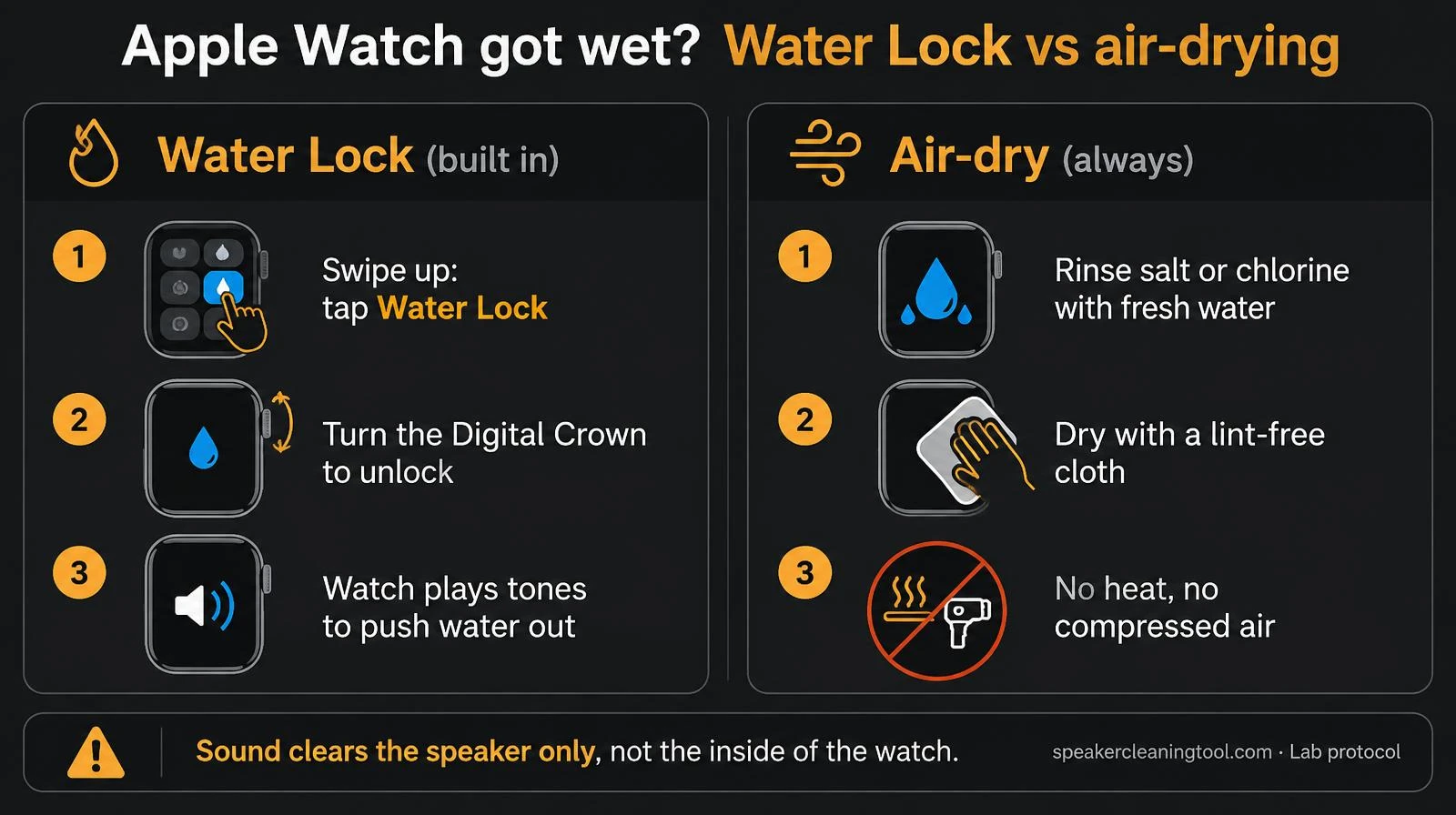
Apple Watch has its own water eject: Water Lock. Swipe up for Control Center, tap the water-drop icon, and when you're out of the water turn the Digital Crown until it unlocks. The watch plays tones that push water out of its speaker. Then rinse off salt or chlorine and air-dry. A tone played on a phone or website can't do this for the watch.
Want to try the fix right now?
Open iPhone Water Eject →
Step by step: eject water with Water Lock
- Before getting wet: swipe up (or press the side button on newer watchOS) to open Control Center and tap Water Lock (the water-drop icon). The screen stops responding to splashes.
- After you're out of the water: turn the Digital Crown until the screen says it's unlocked. On some newer watchOS versions you press and hold the Crown instead.
- Listen for the tones. The watch plays a short series of sounds and you may feel water on your wrist, that's the speaker pushing it out.
- Got wet without Water Lock? Turn it on now and unlock it straight away; it still plays the eject tones.
- Rinse and dry: after salt water, chlorine, soap or sunscreen, rinse under warm fresh tap water and dry with a lint-free cloth.
Why a website tone won't eject water from your watch
Water Lock works because the watch's own speaker vibrates and pushes droplets out of its tiny grille. Sound from a phone held next to the watch reaches it as weak air pressure and won't move water inside the watch's speaker. That's why we don't offer an "Apple Watch tone" here. Use Water Lock. Our tools are for the device that plays the sound: use the iPhone water eject if your phone also got wet.
Problem → what to try
| What happens | Likely cause | What to try |
|---|---|---|
| Can't find Water Lock | Control Center layout differs by watchOS | Open Control Center, scroll, or tap Edit to add the water-drop icon |
| Crown turns but it won't unlock | Not turned or held long enough | Keep turning/holding until the unlock animation finishes |
| Water Lock stuck on | Software hang | Restart the watch with the side button, then try again |
| Speaker still muffled | Droplets left in the grille | Run Water Lock again, then air-dry for a few hours |
| Sticky buttons or Crown | Salt, chlorine or sunscreen residue | Rinse with fresh tap water and dry with a lint-free cloth |
| Muffled for more than a day, or crackles | Possible damage | Contact Apple or an authorised service provider |
Water Lock vs air-drying
| Water Lock tones | Air-drying | |
|---|---|---|
| Speed | Seconds | Hours |
| Clears speaker grille | Yes, mostly | Yes, slowly |
| Removes salt or chlorine | No, rinse first | No, rinse first |
| Fixes water inside the case | No | No, needs service |
What not to do
- Don't use a hair dryer, heater or compressed air.
- Don't push anything into the speaker or microphone holes.
- Don't press buttons underwater, and avoid saunas and steam rooms.
- Don't charge it while the back or band is still wet.
Other devices wet too?
For a phone, use the water eject tool or follow how to get water out of an iPhone speaker. If AirPods sound uneven after a swim, see why one AirPod is quieter.
Related tools & guides
- TooliPhone Water Eject →165 Hz pulse set up for iPhone speakers.
- GuideiPhone Water Guide →Step-by-step rescue for a wet iPhone speaker.
- GuideWater in AirPods Guide →Wet earbuds: wipe, wait two hours, then test.
- GuideOne AirPod Quieter Guide →Balance setting, wax, water or a fault, in order.
- ToolWater Eject →60-second 165 Hz pulse to push water out.
Standards & references
- How to use Water Lock and eject water from your Apple Watch
Apple Support
Official steps for turning Water Lock on and ejecting water with the Digital Crown.
- Water resistance of Apple Watch
Apple Support
Water resistance ratings by model, activities to avoid, and rinsing after salt water, chlorine and soap.
- IEC 60529: Degrees of protection provided by enclosures (IP Code)
International Electrotechnical Commission
Defines what water and dust resistance ratings mean.
Frequently asked questions
+How do I eject water from my Apple Watch?
Open Control Center, tap Water Lock, and when you're out of the water turn the Digital Crown (on newer watchOS versions you may press and hold it instead) until the screen says unlocked. The watch plays a series of tones that push water out of the speaker.
+Can a website or iPhone app play the Apple Watch water eject sound for me?
Not usefully. Water needs to be pushed by the watch's own speaker vibrating. A sound played on your phone next to the watch won't move droplets inside the watch's speaker. Use the built-in Water Lock instead.
+Water Lock won't turn off or the Crown does nothing. What now?
Make sure you turn or hold the Digital Crown long enough for the unlock animation to finish. If it stays stuck, restart the watch by holding the side button, then try again. If it still won't unlock, contact Apple Support.
+My Apple Watch still sounds muffled after Water Lock.
Run Water Lock once or twice more, then leave the watch speaker-side down on a lint-free cloth to air-dry. Some sound loss right after swimming is normal and clears as the speaker dries.
+Should I rinse my Apple Watch after the pool or sea?
Apple recommends rinsing it with warm fresh tap water after exposure to things like salt water, chlorine, soap or sunscreen, then drying it with a lint-free cloth.
+Is my Apple Watch waterproof?
No watch is waterproof. Apple Watch models are water resistant to differing levels, and resistance can drop over time. Apple says not to use it for high-velocity water sports or scuba diving unless your model supports it, and to avoid saunas and steam rooms.